 5ad66daae6
* feat: Add comprehensive Calibre metadata extraction system - Implemented configurable field mapping system for Calibre user_metadata - Added support for series_total custom column extraction - Pre-built mappings for ALL BookMetadata fields (20+ fields) - Added support for Set fields (tags, moods, categories, authors) - Lowercase field names with underscores (Calibre requirement) - Multiple ISBN support (ISBN-10 and ISBN-13 simultaneously) - ISBN hyphen handling (strips hyphens before validation) - Type-safe parsing (String, Integer, Float, Double, Set) - Professional logging with IDENTIFIER prefix - Added CALIBRE_FIELD_MAPPING_REFERENCE.txt documentation - Updated .gitignore and created .dockerignore for test files

* Updated gitignore

* Delete CALIBRE_FIELD_MAPPING_REFERENCE.txt

* Remove unnecessary files: example.epub and og_metadata.java

* Refactor EpubMetadataExtractor to address PR review feedback

- Eliminate DRY violations in identifier extraction with helper methods
- Fix Build-to-Check anti-pattern using processedFields tracking
- Move regex patterns to static constants to avoid recompilation
- Replace magic numbers with calculated prefix lengths
- Consolidate repetitive Set field and pagecount parsing patterns
- Remove excessive documentation and comments
- Remove unrelated .dockerignore and .gitignore entries

* chore: trigger CI/CD pipeline

* Add @Singular annotation to collection fields to support builder accumulation

* Update identifiers to URN format for Calibre compatibility

* fix: resolve MetadataChangeDetectorTest failures and enhance Calibre EPUB integration

- Fixed NullPointerException in testEdgeCase_emptyCollectionToNull_returnsTrue()

- Fixed NullPointerException in testHasValueChanges_whenEmptySetToNull_returnsTrue()

Implementing @Singular for moods and tags prevents metadata fields from being null,

which then fails edge test cases. Since we are no longer double looping during

metadata extraction, @Singular is not needed. Removing it allows the edge case

tests (by Balázs Szücs) to pass.

- Removed douban fields from persistence layer (kept in DTO for DoubanBookParser)

I was under the impression we were saving this value to the DB, but as far as I

can find, we only use Douban data for searching. Adding to the identifiers section

would raise issues with the database not having where to store that value.

Database modifications are left to the professionals.

- Added support for all identifier formats (URN and simple prefix)

Calibre only detects identifiers during IMPORT if they are in URN format.

However, it saves them back as simple prefix. Booklore now handles both.

- Added removeAllCalibreMetadata() to strip all Calibre traces

Cleans up saved EPUBs in Booklore's library, removing all Calibre metadata traces.

- Ensures clean EPUB 3 compliant output with only booklore:* tags

ALL metadata is now saved by Booklore into EPUBs using booklore:* tags.

This preserves Booklore's metadata and we can read it back during import.

Calibre support is ONLY during IMPORT, as it should be since this is the

Booklore project.

(If Calibre users want to extract Booklore metadata, they can build a Calibre

plugin to extract booklore:* tags.)

No longer use #genres or #categories. We stick to dc:subject as suggested,

and Booklore tags can be read from Calibre custom column #extra_tags.

We store tags as booklore:tags.

Removed all tests that used #genres/#categories.

Added tests to check booklore:* tags extraction.

* fix: Remove DoubanId copy helper call - upstream MetadataClearFlags missing isDoubanId()

* Fix Calibre moods and tags extraction from EPUB metadata

- Add fallback logic to check alternative key names (value, #val#) if #value# is missing

- Maintain compatibility with upstream metadata structure changes

* fix: resolve rebase conflicts and compilation errors - Fixed missing closing brace in MetadataRefreshService.java - Added MoodRepository and TagRepository to BookCreatorService - Added addMoodsToBook() and addTagsToBook() methods - Fixed EpubProcessor to use new methods

* Restore Booklore's metadata persistance, Logic Lost during Rebase + Added support for Lubimyczytac and ranobedb

Fixed lubimyczytac metadata not saving during EPUB bookdrop imports.

Root cause: The Angular bookdrop form was missing lubimyczytacId and lubimyczytacRating fields, preventing these values from being sent to the backend during finalization.

Backend fixes:

- EpubMetadataExtractor: Fixed method references with explicit lambdas for lubimyczytac field setters (ranobedb also updated preventively)

- BookMetadataUpdater: Fixed method references with explicit lambdas for lubimyczytac field updates (ranobedb also updated preventively)

Frontend fix:

- bookdrop-file-review.component.ts: Added lubimyczytacId and lubimyczytacRating form fields to createMetadataForm() and resetMetadata() methods

This ensures lubimyczytac metadata extracted from EPUB booklore:tags flows correctly through: extraction → database → UI form → backend → final book record.

* Restore Original ONLY Calibre custom column name to #pagecount So as not to break other users flow.

* fix: resolve compilation error in EpubProcessor.java - Changed bookEntity.getFileName() to bookEntity.getPrimaryBookFile().getFileName() to fix gradlew build check

* Add EPUB 3 compliant prefix declaration for custom booklore metadata

Declares the booklore: prefix in the package element's prefix attribute according to EPUB 3 specification for custom vocabularies.

* Move hardcoverBookId to standard URN identifier format

Changed hardcoverBookId from custom booklore metadata to standard dc:identifier with urn:hardcoverbook: prefix for consistency with other identifiers.

* UPDATE: migrate hardcover_book_id to VARCHAR and fix related issues

## Changes

### 1. Database Migration
- Changed hardcover_book_id column from INTEGER to VARCHAR(255)
- Supports alphanumeric book IDs from Hardcover API
- Updated HardcoverSyncService to handle String ↔ Integer conversion

### 2. Metadata Editor Fixes
- Fixed metadata change detection for provider-specific fields
- Added missing clearFlags entries: hardcoverBookId, lubimyczytacId, lubimyczytacRating
- Resolves issue where rating/review count fields wouldn't save independently

Affected fields now save properly independently:
- Amazon rating & review count
- Goodreads rating & review count
- Hardcover rating & review count
- Lubimyczytac rating
- Ranobedb rating

### 3. Web Reader Hardcover Sync (Major Fix)
Since I changed the data type for hardcover_book_id I had to update references in the HardCoverSyncService.java This turned out to reveal
the Sync Service was not fully implemented:
- Added Hardcover progress sync to ReadingProgressService
- Previously, HARDCOVER sync only worked for Kobo and KOReader devices
- Web browser reading progress now syncs to Hardcover.app

## Files Modified
- booklore-api/src/main/resources/db/migration/V107__Change_hardcover_book_id_to_varchar.sql
- booklore-api/src/main/java/.../service/hardcover/HardcoverSyncService.java
- booklore-api/src/main/java/.../service/progress/ReadingProgressService.java
- booklore-ui/src/app/features/metadata/.../metadata-editor.component.ts

## Breaking Changes
None - migration handles existing integer IDs gracefully

## Testing
- Hardcover sync tested with web reader
- Metadata editor field updates verified
- Database migration confirmed successful

---------

Co-authored-by: ACX <8075870+acx10@users.noreply.github.com>
📚 BookLore
Your Personal Library, Beautifully Organized
🌐 Official Website: https://booklore.org







BookLore is a powerful, self-hosted web application designed to organize and manage your personal book collection with elegance and ease. Build your dream library with an intuitive interface, robust metadata management, and seamless multi-user support.
✨ Features That Make BookLore Shine
📖 Library Management
|
🌐 Connectivity
|
👥 User Experience
|
🚀 Smart Features
|
💖 Support the Project
Your support helps BookLore grow and improve! 🌱
⭐ Star UsGive us a star to show your support and help others discover BookLore! |
💰 SponsorSupport development, hosting, and testing costs |
📢 Spread the WordShare BookLore with fellow book lovers and developers! |


🎯 Current Goal: Raising funds for a Kobo device to implement native Kobo sync support
💡 Support the Kobo Sync Bounty →
🎮 Live Demo: Explore BookLore in Action
Experience BookLore's features in a live environment before deploying your own instance!
| 🌐 Demo URL | 👤 Username | 🔑 Password |
|---|---|---|
| demo.booklore.org | booklore |
9HC20PGGfitvWaZ1 |
⚠️ Note: Demo account has standard user permissions only.
Admin features (user management, library setup) require a self-hosted instance.
🚀 Getting Started with BookLore
Choose Your Path
📘 DocumentationGuides for installation, setup, features, and more Contribute to the docs at: booklore-docs |
🐳 Quick DeployGet up and running in minutes with Docker Easiest way to self-host BookLore |


🐳 Deploy with Docker
Prerequisites
Ensure you have Docker and Docker Compose installed.
📦 Image Repositories
- 🐳 Docker Hub:
booklore/booklore - 📦 GitHub Container Registry:
ghcr.io/booklore-app/booklore
💡 Legacy images at
ghcr.io/adityachandelgit/booklore-appremain available but won't receive updates.
Step 1️⃣: Create Environment Configuration
Create a .env file in your project directory:
# 🎯 BookLore Application Settings
APP_USER_ID=0
APP_GROUP_ID=0
TZ=Etc/UTC
BOOKLORE_PORT=6060

# 🗄️ Database Connection (BookLore)
DATABASE_URL=jdbc:mariadb://mariadb:3306/booklore
DB_USER=booklore
DB_PASSWORD=ChangeMe_BookLoreApp_2025!

# 💾 Storage type: LOCAL (default) or NETWORK. Set to NETWORK if using NFS/SMB - this disables file reorganization features to prevent data corruption.
DISK_TYPE=LOCAL

# 🔧 MariaDB Container Settings
DB_USER_ID=1000
DB_GROUP_ID=1000
MYSQL_ROOT_PASSWORD=ChangeMe_MariaDBRoot_2025!
MYSQL_DATABASE=booklore
Step 2️⃣: Create Docker Compose File
Create a docker-compose.yml file:
services:
  booklore:
    image: booklore/booklore:latest
    # Alternative: Use GitHub Container Registry
    # image: ghcr.io/booklore-app/booklore:latest
    container_name: booklore
    environment:
      - USER_ID=${APP_USER_ID}
      - GROUP_ID=${APP_GROUP_ID}
      - TZ=${TZ}
      - DATABASE_URL=${DATABASE_URL}
      - DATABASE_USERNAME=${DB_USER}
      - DATABASE_PASSWORD=${DB_PASSWORD}
      - BOOKLORE_PORT=${BOOKLORE_PORT}
    depends_on:
      mariadb:
        condition: service_healthy
    ports:
      - "${BOOKLORE_PORT}:${BOOKLORE_PORT}"
    volumes:
      - ./data:/app/data
      - ./books:/books
      - ./bookdrop:/bookdrop
    healthcheck:
      test: wget -q -O - http://localhost:${BOOKLORE_PORT}/api/v1/healthcheck
      interval: 60s
      retries: 5
      start_period: 60s
      timeout: 10s
    restart: unless-stopped

  mariadb:
    image: lscr.io/linuxserver/mariadb:11.4.5
    container_name: mariadb
    environment:
      - PUID=${DB_USER_ID}
      - PGID=${DB_GROUP_ID}
      - TZ=${TZ}
      - MYSQL_ROOT_PASSWORD=${MYSQL_ROOT_PASSWORD}
      - MYSQL_DATABASE=${MYSQL_DATABASE}
      - MYSQL_USER=${DB_USER}
      - MYSQL_PASSWORD=${DB_PASSWORD}
    volumes:
      - ./mariadb/config:/config
    restart: unless-stopped
    healthcheck:
      test: [ "CMD", "mariadb-admin", "ping", "-h", "localhost" ]
      interval: 5s
      timeout: 5s
      retries: 10
Step 3️⃣: Launch BookLore
docker compose up -d
Step 4️⃣: Access Your Library
Open your browser and navigate to:
🎉 Welcome to your personal library!
📥 BookDrop: Automatic Import
Drop Files, Import Automatically
BookLore's BookDrop feature automatically detects and processes book files dropped into a designated folder.
How It Works
graph LR
    A[📁 Drop Files] --> B[🔍 Auto-Detect]
    B --> C[📊 Extract Metadata]
    C --> D[✅ Review & Import]
- File Watcher: Monitors the BookDrop folder continuously
- Auto-Detection: Processes new files and extracts metadata
- Metadata Enrichment: Fetches details from Google Books, Open Library
- Review & Finalize: Review, edit, and import to your library
Docker Configuration
Add the BookDrop volume to your docker-compose.yml:
services:
  booklore:
    volumes:
      - ./data:/app/data
      - ./books:/books
      - ./bookdrop:/bookdrop  # 👈 BookDrop magic happens here
🤝 Community & Support
🐞 Bug ReportsFound an issue? |
💡 Feature ReqHave an idea? |
🤝 ContributeJoin development! |
💬 ChatJoin community! |




📊 Project Analytics
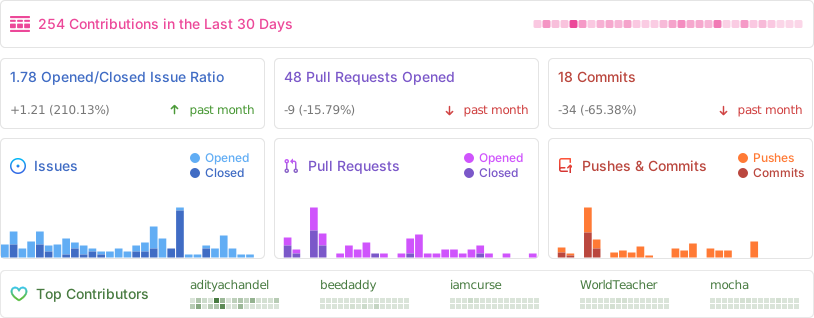
Repository Activity
⭐ Star History
👨💻 Contributors
Thanks to all our amazing contributors! 🙏
Want to see your face here? Start contributing today!
🌟 Sponsors
Thank you to our amazing sponsors!


Become a sponsor and get your logo here! Support us on Open Collective
⚖️ License
GNU Affero General Public License v3.0 (AGPL-3.0)
Copyright © 2024-2026 BookLore

Made with ❤️ by the BookLore community