 c7fa64c045
Add fallback mechanism to extract EPUB cover images when the primary
epub4j getCoverImage() method returns null. The new fallback reads
the 'cover' meta attribute from EPUB metadata and uses it to look up
the cover resource by ID.

This improves cover detection for EPUBs that use the traditional
<meta name="cover" content="image-id"/> and the cover image href
uses a URL-encoded special character which epub4j can't resolve.

Changes:
- Add cover extraction fallback via getMetaAttribute("cover")
- Add null safety check for coverId before resource lookup
- Add test with URL-encoded href to verify proper path handling
📚 BookLore
Your Personal Library, Beautifully Organized
🌐 Official Website: https://booklore.org







BookLore is a powerful, self-hosted web application designed to organize and manage your personal book collection with elegance and ease. Build your dream library with an intuitive interface, robust metadata management, and seamless multi-user support.
✨ Features That Make BookLore Shine
📖 Library Management
|
🌐 Connectivity
|
👥 User Experience
|
🚀 Smart Features
|
💖 Support the Project
Your support helps BookLore grow and improve! 🌱
⭐ Star UsGive us a star to show your support and help others discover BookLore! |
💰 SponsorSupport development, hosting, and testing costs |
📢 Spread the WordShare BookLore with fellow book lovers and developers! |


🎯 Current Goal: Raising funds for a Kobo device to implement native Kobo sync support
💡 Support the Kobo Sync Bounty →
🎮 Live Demo: Explore BookLore in Action
Experience BookLore's features in a live environment before deploying your own instance!
| 🌐 Demo URL | 👤 Username | 🔑 Password |
|---|---|---|
| demo.booklore.org | booklore |
9HC20PGGfitvWaZ1 |
⚠️ Note: Demo account has standard user permissions only.
Admin features (user management, library setup) require a self-hosted instance.
🚀 Getting Started with BookLore
Choose Your Path
📘 DocumentationGuides for installation, setup, features, and more Contribute to the docs at: booklore-docs |
🐳 Quick DeployGet up and running in minutes with Docker Easiest way to self-host BookLore |


🐳 Deploy with Docker
Prerequisites
Ensure you have Docker and Docker Compose installed.
📦 Image Repositories
- 🐳 Docker Hub:
booklore/booklore - 📦 GitHub Container Registry:
ghcr.io/booklore-app/booklore
💡 Legacy images at
ghcr.io/adityachandelgit/booklore-appremain available but won't receive updates.
Step 1️⃣: Create Environment Configuration
Create a .env file in your project directory:
# 🎯 BookLore Application Settings
APP_USER_ID=0
APP_GROUP_ID=0
TZ=Etc/UTC
BOOKLORE_PORT=6060

# 🗄️ Database Connection (BookLore)
DATABASE_URL=jdbc:mariadb://mariadb:3306/booklore
DB_USER=booklore
DB_PASSWORD=ChangeMe_BookLoreApp_2025!

# 🔧 MariaDB Container Settings
DB_USER_ID=1000
DB_GROUP_ID=1000
MYSQL_ROOT_PASSWORD=ChangeMe_MariaDBRoot_2025!
MYSQL_DATABASE=booklore
Step 2️⃣: Create Docker Compose File
Create a docker-compose.yml file:
services:
  booklore:
    image: booklore/booklore:latest
    # Alternative: Use GitHub Container Registry
    # image: ghcr.io/booklore-app/booklore:latest
    container_name: booklore
    environment:
      - USER_ID=${APP_USER_ID}
      - GROUP_ID=${APP_GROUP_ID}
      - TZ=${TZ}
      - DATABASE_URL=${DATABASE_URL}
      - DATABASE_USERNAME=${DB_USER}
      - DATABASE_PASSWORD=${DB_PASSWORD}
      - BOOKLORE_PORT=${BOOKLORE_PORT}
    depends_on:
      mariadb:
        condition: service_healthy
    ports:
      - "${BOOKLORE_PORT}:${BOOKLORE_PORT}"
    volumes:
      - ./data:/app/data
      - ./books:/books
      - ./bookdrop:/bookdrop
    healthcheck:
      test: wget -q -O - http://localhost:${BOOKLORE_PORT}/api/v1/healthcheck
      interval: 60s
      retries: 5
      start_period: 60s
      timeout: 10s
    restart: unless-stopped

  mariadb:
    image: lscr.io/linuxserver/mariadb:11.4.5
    container_name: mariadb
    environment:
      - PUID=${DB_USER_ID}
      - PGID=${DB_GROUP_ID}
      - TZ=${TZ}
      - MYSQL_ROOT_PASSWORD=${MYSQL_ROOT_PASSWORD}
      - MYSQL_DATABASE=${MYSQL_DATABASE}
      - MYSQL_USER=${DB_USER}
      - MYSQL_PASSWORD=${DB_PASSWORD}
    volumes:
      - ./mariadb/config:/config
    restart: unless-stopped
    healthcheck:
      test: [ "CMD", "mariadb-admin", "ping", "-h", "localhost" ]
      interval: 5s
      timeout: 5s
      retries: 10
Step 3️⃣: Launch BookLore
docker compose up -d
Step 4️⃣: Access Your Library
Open your browser and navigate to:
🎉 Welcome to your personal library!
📥 BookDrop: Automatic Import
Drop Files, Import Automatically
BookLore's BookDrop feature automatically detects and processes book files dropped into a designated folder.
How It Works
graph LR
    A[📁 Drop Files] --> B[🔍 Auto-Detect]
    B --> C[📊 Extract Metadata]
    C --> D[✅ Review & Import]
- File Watcher: Monitors the BookDrop folder continuously
- Auto-Detection: Processes new files and extracts metadata
- Metadata Enrichment: Fetches details from Google Books, Open Library
- Review & Finalize: Review, edit, and import to your library
Docker Configuration
Add the BookDrop volume to your docker-compose.yml:
services:
  booklore:
    volumes:
      - ./data:/app/data
      - ./books:/books
      - ./bookdrop:/bookdrop  # 👈 BookDrop magic happens here
🤝 Community & Support
🐞 Bug ReportsFound an issue? |
💡 Feature ReqHave an idea? |
🤝 ContributeJoin development! |
💬 ChatJoin community! |




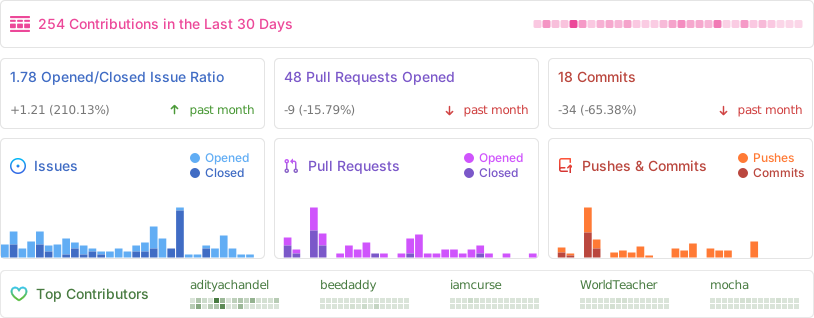
📊 Project Analytics
Repository Activity
⭐ Star History
👨💻 Contributors
Thanks to all our amazing contributors! 🙏
Want to see your face here? Start contributing today!
🌟 Sponsors
Thank you to our amazing sponsors!

Become a sponsor and get your logo here! Support us on Open Collective
⚖️ License
GNU General Public License v3.0
Copyright © 2024-2026 BookLore

Made with ❤️ by the BookLore community