
10 KiB
📚 BookLore
Your Personal Library, Reimagined






A self-hosted, feature-rich platform for organizing and managing your digital book collection.
Built for book lovers, by book lovers.

✨ Live Demo • 📖 Documentation • 🐛 Report Bug • 💡 Request Feature
🌟 Why BookLore?
BookLore transforms the way you interact with your digital library. Whether you're a casual reader or a bibliophile with thousands of titles, BookLore provides the tools you need to organize, discover, and enjoy your collection.
📚 Smart Library Management
|
🔄 Seamless Integration
|
🧠 Intelligent Metadata
|
👥 Multi-User Ready
|
✨ Feature Highlights
📖 Reading Experience
- Built-in Reader: Enjoy PDFs, EPUBs, and comics with customizable themes
- Progress Tracking: Sync reading progress across devices
- Personal Notes: Save private annotations visible only to you
- Mobile Optimized: Fully responsive design for reading anywhere
🔧 Power Features
- BookDrop Import: Auto-detect and bulk import from a watched folder
- Magic Shelves: Create rule-based collections that update automatically
- Format Conversion: Automatic EPUB to KEPUB conversion
- Metadata Enrichment: Pull rich details from multiple online sources
🌐 Connectivity
- OPDS Server: Connect any compatible reading app wirelessly
- Kobo Integration: Seamless sync with Kobo e-readers
- API Access: Programmatic access to your library
- Email Distribution: One-click book sharing via email
💖 Support Development
Your support helps keep BookLore growing and improving!


Current Fundraising Goal: 🎯 Kobo Device for Testing
Help us implement and test native Kobo sync support by contributing to our bounty →
🌐 Try the Live Demo
Experience BookLore before deploying your own instance:
| 🔗 | demo.booklore.dev |
|---|---|
| 👤 | Username: booklore |
| 🔑 | Password: 9HC20PGGfitvWaZ1 |
📌 Note: Demo has standard user permissions. Admin features require a self-hosted instance.
🚀 Quick Start
Prerequisites
Ensure you have Docker and Docker Compose installed on your system.
📦 Available Images
| Registry | Image URL |
|---|---|
| 🐳 Docker Hub | booklore/booklore:latest |
| 📦 GitHub | ghcr.io/booklore-app/booklore:latest |
⚠️ Legacy images at
ghcr.io/adityachandelgit/booklore-appremain available but won't receive updates.
🐳 Docker Deployment
Step 1: Create Environment Configuration
Create a .env file with your configuration:
# Application Settings
APP_USER_ID=0
APP_GROUP_ID=0
TZ=Etc/UTC
BOOKLORE_PORT=6060

# Database Connection
DATABASE_URL=jdbc:mariadb://mariadb:3306/booklore
DB_USER=booklore
DB_PASSWORD=ChangeMe_BookLoreApp_2025!

# MariaDB Configuration
DB_USER_ID=1000
DB_GROUP_ID=1000
MYSQL_ROOT_PASSWORD=ChangeMe_MariaDBRoot_2025!
MYSQL_DATABASE=booklore
Step 2: Create Docker Compose File
Create docker-compose.yml:
services:
  booklore:
    image: booklore/booklore:latest
    container_name: booklore
    environment:
      - USER_ID=${APP_USER_ID}
      - GROUP_ID=${APP_GROUP_ID}
      - TZ=${TZ}
      - DATABASE_URL=${DATABASE_URL}
      - DATABASE_USERNAME=${DB_USER}
      - DATABASE_PASSWORD=${DB_PASSWORD}
      - BOOKLORE_PORT=${BOOKLORE_PORT}
    depends_on:
      mariadb:
        condition: service_healthy
    ports:
      - "${BOOKLORE_PORT}:${BOOKLORE_PORT}"
    volumes:
      - ./data:/app/data
      - ./books:/books
      - ./bookdrop:/bookdrop
    restart: unless-stopped

  mariadb:
    image: lscr.io/linuxserver/mariadb:11.4.5
    container_name: mariadb
    environment:
      - PUID=${DB_USER_ID}
      - PGID=${DB_GROUP_ID}
      - TZ=${TZ}
      - MYSQL_ROOT_PASSWORD=${MYSQL_ROOT_PASSWORD}
      - MYSQL_DATABASE=${MYSQL_DATABASE}
      - MYSQL_USER=${DB_USER}
      - MYSQL_PASSWORD=${DB_PASSWORD}
    volumes:
      - ./mariadb/config:/config
    restart: unless-stopped
    healthcheck:
      test: ["CMD", "mariadb-admin", "ping", "-h", "localhost"]
      interval: 5s
      timeout: 5s
      retries: 10
Step 3: Launch BookLore
docker compose up -d
Step 4: Access Your Library
Open your browser and navigate to:
http://localhost:6060
📥 BookDrop: Automated Import
The BookDrop feature enables effortless bulk importing of books into your library.
How It Works
graph LR
    A[Drop Files] --> B[Auto-Detection]
    B --> C[Metadata Extraction]
    C --> D[Review & Edit]
    D --> E[Import to Library]
- 📁 Drop Files: Place books in the BookDrop folder
- 🔍 Detection: Automatic file monitoring and recognition
- 📊 Metadata: Extract or fetch book information
- ✏️ Review: Edit metadata before final import
- ✅ Import: Add to your organized library
Configuration
The BookDrop folder is automatically configured in the Docker setup:
volumes:
  - ./bookdrop:/bookdrop  # 👈 Auto-import directory
Simply drop your .pdf, .epub, .cbz, or other supported files into this folder, and BookLore handles the rest!
📚 Documentation
For comprehensive guides, configuration options, and troubleshooting:
📖 Visit Full Documentation →
Installation • Configuration • Features • API • Troubleshooting
💡 Contribute to Docs: Improve our documentation at booklore-app/booklore-docs
🤝 Community & Contribution



We welcome contributions of all kinds! Whether it's:
- 🐛 Bug reports and fixes
- ✨ Feature requests and implementations
- 📖 Documentation improvements
- 🌍 Translations and localization
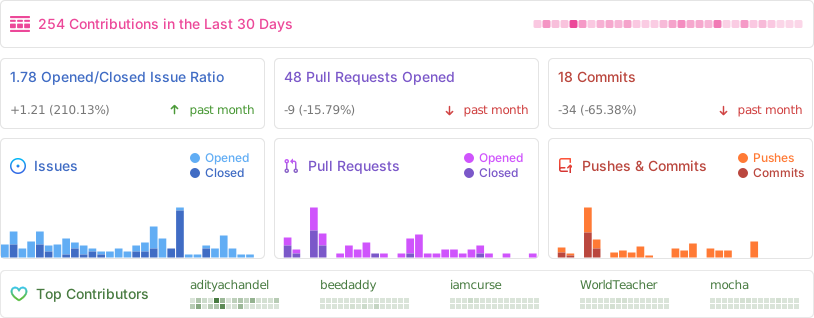
📊 Project Stats
Repository Activity
⭐ Star History
🙏 Contributors
Thank you to all our amazing contributors who help make BookLore better!
⚖️ License
GNU General Public License v3.0
Copyright © 2024-2025 BookLore Contributors
Made with ❤️ by the BookLore Community
Star ⭐ this repository if you find it helpful!