 3f334202b6
* fix: support reading alternative book formats using bookType query param

* feat: add streaming reader support for alternative EPUB formats

* refactor: extract tabs section into MetadataTabsComponent

* feat: implement per-file reading progress tracking

* feat: add configurable format priority with cascading fallback

* refactor: redesign library creator with single-page layout

* refactor: unify reading progress into ReadingProgressService

* refactor: improve delete options with clearer file format and book deletion

* refactor: improve book format matching with normalization and fuzzy fallback

* feat: add folder-based audiobook support with ZIP downloads and preparing state

* fix: display unique format types in metadata viewer

* refactor: auto-attach files to single book in folder during rescan

* feat: implement folder-centric book file grouping with fuzzy matching

* refactor: consolidate book grouping with organization mode support

* fix: use folder hash for folder-based audiobooks in auto-attach

* fix: delete only BookFileEntity on file removal, not entire book

* fix: set folderBased flag and correct file size for auto-attached audiobook folders

* fix: use count query to avoid lazy initialization in file delete handler

* fix: preserve book metadata when file is moved by detecting hash match

* fix: skip books with no files in restoration to avoid NPE

* fix: round all progress percentages to one decimal place before sending to UI

* style: improve library creator dialog spacing and layout

* fix: migrate FOLDER_AS_BOOK to BOOK_PER_FOLDER for backwards compatibility

* fix: FileMoveService now handles multi-file BookEntity properly

* style: redesign metadata-picker and file-mover UI components

* style: redesign file-naming-pattern UI and improve theme contrast

* style: relax spacing in library-creator component

* style: tighten directory-picker layout for consistency

* fix: PathPatternResolver now respects folderBased flag for audiobooks

* style: move checkmark column to left side and add pending status in file-mover

* refactor: consolidate BookFileType into BookType and add audiobook styling

* feat: show 'Continue Reading' button for in-progress books

* fix: preserve dots in folder names during grouping and prevent duplicate attachments

* style: reduce gap between download-all button and primary file section

* style: shorten 'Continue Reading' button to 'Read' on mobile

* feat: add DISK_TYPE config to disable file moves on network storage

* style: standardize settings pages with shared styles and consistent spacing

* style: revamp settings pages with modern card-based layouts

* style: revamp OPDS, auth, and task management settings layouts

* fix: update FileMoveService tests to include AppProperties parameter

* fix: derive BookFileType from extension when uploading additional book files

* feat: show format type and size in download button with dropdown for alternatives

* feat: add audiobook streaming player with HTTP Range support

* feat: add M4B chapter extraction and chapter navigation

* feat: add audiobook bookmarks and sleep timer

* refactor: split AudiobookReaderService into focused services

* feat: add Media Session API for background audio playback

* feat: display file extensions in format tags with distinct colors and add audiobook upload support

* feat: require bookFileId for viewer settings API

* fix: show split button for audiobooks with readable alternatives

* feat: improve reading sessions table with book type badges and better formatting

* feat: add audiobook play button in files tab

* feat: use file extension for format display and meaningful tab values

* feat: add extension field to BookFile DTO

* feat: use extension field for book card format pill

* fix: use mixed orientation for format priority drag-drop to support multi-line layout

* feat: add attach book files feature to consolidate single-file books

* fix: increase drag handle size for format priority chips

* fix: add missing BookFileRepository mock to BookServiceDeleteTests

* feat: add delete buttons to files tab and move shelf to other items menu

* feat: add physical books support for cataloging books without digital files

* refactor: redesign icon-picker component with improved styling

* refactor: redesign metadata-picker component with improved layout and alignment

* refactor: move Add Physical Book to top of library menu

* refactor: use p-autoComplete for authors/categories in add-physical-book dialog

* feat: add square cover search and display support for audiobooks

* fix: navigate to first page when opening unread ebooks

* fix: exclude API requests from service worker interception

* feat: support fileless books with automatic file attachment

* fix: bypass service worker for audiobook streaming requests

* refactor: remove alphabetical filter sorting, default to count, limit filters to 100

---------

Co-authored-by: acx10 <acx10@users.noreply.github.com>
12 KiB
📚 BookLore
Your Personal Library, Beautifully Organized
🌐 Official Website: https://booklore.org







BookLore is a powerful, self-hosted web application designed to organize and manage your personal book collection with elegance and ease. Build your dream library with an intuitive interface, robust metadata management, and seamless multi-user support.
✨ Features That Make BookLore Shine
📖 Library Management
|
🌐 Connectivity
|
👥 User Experience
|
🚀 Smart Features
|
💖 Support the Project
Your support helps BookLore grow and improve! 🌱
⭐ Star UsGive us a star to show your support and help others discover BookLore! |
💰 SponsorSupport development, hosting, and testing costs |
📢 Spread the WordShare BookLore with fellow book lovers and developers! |


🎯 Current Goal: Raising funds for a Kobo device to implement native Kobo sync support
💡 Support the Kobo Sync Bounty →
🎮 Live Demo: Explore BookLore in Action
Experience BookLore's features in a live environment before deploying your own instance!
| 🌐 Demo URL | 👤 Username | 🔑 Password |
|---|---|---|
| demo.booklore.org | booklore |
9HC20PGGfitvWaZ1 |
⚠️ Note: Demo account has standard user permissions only.
Admin features (user management, library setup) require a self-hosted instance.
🚀 Getting Started with BookLore
Choose Your Path
📘 DocumentationGuides for installation, setup, features, and more Contribute to the docs at: booklore-docs |
🐳 Quick DeployGet up and running in minutes with Docker Easiest way to self-host BookLore |


🐳 Deploy with Docker
Prerequisites
Ensure you have Docker and Docker Compose installed.
📦 Image Repositories
- 🐳 Docker Hub:
booklore/booklore - 📦 GitHub Container Registry:
ghcr.io/booklore-app/booklore
💡 Legacy images at
ghcr.io/adityachandelgit/booklore-appremain available but won't receive updates.
Step 1️⃣: Create Environment Configuration
Create a .env file in your project directory:
# 🎯 BookLore Application Settings
APP_USER_ID=0
APP_GROUP_ID=0
TZ=Etc/UTC
BOOKLORE_PORT=6060

# 🗄️ Database Connection (BookLore)
DATABASE_URL=jdbc:mariadb://mariadb:3306/booklore
DB_USER=booklore
DB_PASSWORD=ChangeMe_BookLoreApp_2025!

# 💾 Storage type: LOCAL (default) or NETWORK. Set to NETWORK if using NFS/SMB - this disables file reorganization features to prevent data corruption.
DISK_TYPE=LOCAL

# 🔧 MariaDB Container Settings
DB_USER_ID=1000
DB_GROUP_ID=1000
MYSQL_ROOT_PASSWORD=ChangeMe_MariaDBRoot_2025!
MYSQL_DATABASE=booklore
Step 2️⃣: Create Docker Compose File
Create a docker-compose.yml file:
services:
  booklore:
    image: booklore/booklore:latest
    # Alternative: Use GitHub Container Registry
    # image: ghcr.io/booklore-app/booklore:latest
    container_name: booklore
    environment:
      - USER_ID=${APP_USER_ID}
      - GROUP_ID=${APP_GROUP_ID}
      - TZ=${TZ}
      - DATABASE_URL=${DATABASE_URL}
      - DATABASE_USERNAME=${DB_USER}
      - DATABASE_PASSWORD=${DB_PASSWORD}
      - BOOKLORE_PORT=${BOOKLORE_PORT}
    depends_on:
      mariadb:
        condition: service_healthy
    ports:
      - "${BOOKLORE_PORT}:${BOOKLORE_PORT}"
    volumes:
      - ./data:/app/data
      - ./books:/books
      - ./bookdrop:/bookdrop
    healthcheck:
      test: wget -q -O - http://localhost:${BOOKLORE_PORT}/api/v1/healthcheck
      interval: 60s
      retries: 5
      start_period: 60s
      timeout: 10s
    restart: unless-stopped

  mariadb:
    image: lscr.io/linuxserver/mariadb:11.4.5
    container_name: mariadb
    environment:
      - PUID=${DB_USER_ID}
      - PGID=${DB_GROUP_ID}
      - TZ=${TZ}
      - MYSQL_ROOT_PASSWORD=${MYSQL_ROOT_PASSWORD}
      - MYSQL_DATABASE=${MYSQL_DATABASE}
      - MYSQL_USER=${DB_USER}
      - MYSQL_PASSWORD=${DB_PASSWORD}
    volumes:
      - ./mariadb/config:/config
    restart: unless-stopped
    healthcheck:
      test: [ "CMD", "mariadb-admin", "ping", "-h", "localhost" ]
      interval: 5s
      timeout: 5s
      retries: 10
Step 3️⃣: Launch BookLore
docker compose up -d
Step 4️⃣: Access Your Library
Open your browser and navigate to:
🎉 Welcome to your personal library!
📥 BookDrop: Automatic Import
Drop Files, Import Automatically
BookLore's BookDrop feature automatically detects and processes book files dropped into a designated folder.
How It Works
graph LR
    A[📁 Drop Files] --> B[🔍 Auto-Detect]
    B --> C[📊 Extract Metadata]
    C --> D[✅ Review & Import]
- File Watcher: Monitors the BookDrop folder continuously
- Auto-Detection: Processes new files and extracts metadata
- Metadata Enrichment: Fetches details from Google Books, Open Library
- Review & Finalize: Review, edit, and import to your library
Docker Configuration
Add the BookDrop volume to your docker-compose.yml:
services:
  booklore:
    volumes:
      - ./data:/app/data
      - ./books:/books
      - ./bookdrop:/bookdrop  # 👈 BookDrop magic happens here
🤝 Community & Support
🐞 Bug ReportsFound an issue? |
💡 Feature ReqHave an idea? |
🤝 ContributeJoin development! |
💬 ChatJoin community! |




📊 Project Analytics
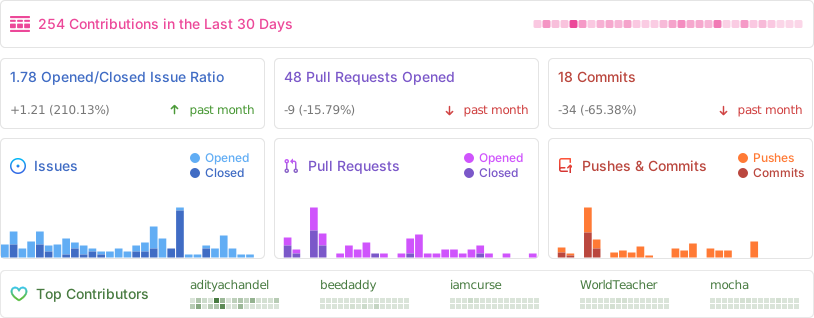
Repository Activity
⭐ Star History
👨💻 Contributors
Thanks to all our amazing contributors! 🙏
Want to see your face here? Start contributing today!
🌟 Sponsors
Thank you to our amazing sponsors!


Become a sponsor and get your logo here! Support us on Open Collective
⚖️ License
GNU Affero General Public License v3.0 (AGPL-3.0)
Copyright © 2024-2026 BookLore

Made with ❤️ by the BookLore community