 2be02017d4
* refactor(book): extract file-specific information from book

First commit in a series aimed at refactoring the data model for books.
More specifically, the idea is to extract all file-specific information
from the `book` table and move it to the `book_file` table, previously named `book_additional_file`

The aim is to make it easier to:
* Improve support for books with multiple file formats (PDF, EPUB, etc) for all interactions (Read, Download, etc)
* Support for merging/unmerging books
* Add support for additional file types
* Specify preferred formats at the user level

Ref: #489

* refactor(book): ensure the API build and runs

Further work on the refactoring aimed at separating file-related details
from the `book` table.

With this commit all the missing changes that were prventing the API to build
or to book have been addressed.

TODO: test extensively, adjust existing unit tests and add new ones

* fix(read): add mapping for book format

This restores the read functionality which relies on the book format field
to decide which reader to use.

* fix: fix read, dowload and file upload

This commit fixes multiple issues either caused by the refactoring or pre-existing:

* Fix the Read button behaviour after the refactoring
* Unregister the watcher process when uploading additional formats
* Fix downloading of additional book formats (using the wrong ID)

* fix: adjust tests to use the new BookFileEntity class

All the tests that used to fecth file information from BookEntity
now need to get them from the relevant BookFileEntity

* fix: do not rely on AdditionalFileType

* Use the BookFileEntity bookFormat instead

* fix: use the relevant BookFileEntity class

* fix: call the right methods

* fix: Add missing mapping for the test

* fix: adapt the test to the new semantics

All book files, including the primary one, are treated as equal now.
The tests needs to take that into account when checking for additional
formats.

* fix: use mutable lists

* fix: fix syntax for droppung unique constraint

MariaDB uses indexes, not constraints

* fix: regression on book file ordering

We want to make this refactoring 100% compatible with the current behaviour (modulo a few bugs),
therefore we need to maintain the right order to ensure the "primary" book stays the same
after the migration.

* fix: allow download of supplementary files

* fix(opds): replace removed additionalFiles entity graph with bookFiles

- Update BookOpdsRepository @EntityGraph paths to use BookEntity.bookFiles after the refactor
- Add @DataJpaTest to validate BookOpdsRepository wiring and catch invalid EntityGraph attributes
- Add H2 as testRuntimeOnly dependency so the JPA slice test can run with an embedded DB

* chore(bookdrop): mount bookdrop folder from a local directory

It's consistent with the library dir, and makes debugging easier
when working on the local environment

* fix: rename migration after rebase

It's no longer 66, bumped to 73

* fix: handle BookEntity primary file NPEs after rebase

Adjust tests to always instanciate BookFileEntity when manipulating
BookEntity.

* chore: rename migration to avoid conflict

V73 is already taken on develop, V67 was left "unused"

* chore: rename again to ensure it's applied

* fix: make sure to flush the data to DB

Without the flush there is a high chance of leaving the DB in an inconsistent
state after a book move.

* fix: move all files belonging to a book

This fixes a pre-existing bug which has some nasty ramifications.
We never moved "additional files" when changing library for a book entity,
causing them to become effectively "unreacheable" from the UI.

* fix(migration): remove the unique index before importing data

* fix: fix build and test after rebase

* fix(migration): drop legacy table

* fix(upload): use the templetized name when storing on DB

* fix(rebase): Add logical fixes post rebase

* Adapt the code to properly handle the new `archive_type` field and logic
* Bump the version number for the DB migration
* Use `getPrimaryBookFile()` whenever trying to access book files

* fix(migration): Handle additional book formats

* Add support for FB2 files
* Corretly handle cb7 files as CBX

* fix(file mover): fix a regression when moving books across categories

The previous approach would trigger the JPA's `orphanRemoval` parameter on the
bookEntities, effetively triggering a delete on the DB.

This caused files to be moved but the data on the DB would get stale, also causing
additional formats to be treated as separate books upon a rescan.

* fix(rescan): do not delete alternative files on rescan

Upon library rescan, additional files such as images were removed from
book entities association when using the "Each file is a book" library structure.
📚 BookLore
Your Personal Library, Beautifully Organized
🌐 Official Website: https://booklore.org







BookLore is a powerful, self-hosted web application designed to organize and manage your personal book collection with elegance and ease. Build your dream library with an intuitive interface, robust metadata management, and seamless multi-user support.
✨ Features That Make BookLore Shine
📖 Library Management
|
🌐 Connectivity
|
👥 User Experience
|
🚀 Smart Features
|
💖 Support the Project
Your support helps BookLore grow and improve! 🌱
⭐ Star UsGive us a star to show your support and help others discover BookLore! |
💰 SponsorSupport development, hosting, and testing costs |
📢 Spread the WordShare BookLore with fellow book lovers and developers! |


🎯 Current Goal: Raising funds for a Kobo device to implement native Kobo sync support
💡 Support the Kobo Sync Bounty →
🎮 Live Demo: Explore BookLore in Action
Experience BookLore's features in a live environment before deploying your own instance!
| 🌐 Demo URL | 👤 Username | 🔑 Password |
|---|---|---|
| demo.booklore.org | booklore |
9HC20PGGfitvWaZ1 |
⚠️ Note: Demo account has standard user permissions only.
Admin features (user management, library setup) require a self-hosted instance.
🚀 Getting Started with BookLore
Choose Your Path
📘 DocumentationGuides for installation, setup, features, and more Contribute to the docs at: booklore-docs |
🐳 Quick DeployGet up and running in minutes with Docker Easiest way to self-host BookLore |


🐳 Deploy with Docker
Prerequisites
Ensure you have Docker and Docker Compose installed.
📦 Image Repositories
- 🐳 Docker Hub:
booklore/booklore - 📦 GitHub Container Registry:
ghcr.io/booklore-app/booklore
💡 Legacy images at
ghcr.io/adityachandelgit/booklore-appremain available but won't receive updates.
Step 1️⃣: Create Environment Configuration
Create a .env file in your project directory:
# 🎯 BookLore Application Settings
APP_USER_ID=0
APP_GROUP_ID=0
TZ=Etc/UTC
BOOKLORE_PORT=6060

# 🗄️ Database Connection (BookLore)
DATABASE_URL=jdbc:mariadb://mariadb:3306/booklore
DB_USER=booklore
DB_PASSWORD=ChangeMe_BookLoreApp_2025!

# 🔧 MariaDB Container Settings
DB_USER_ID=1000
DB_GROUP_ID=1000
MYSQL_ROOT_PASSWORD=ChangeMe_MariaDBRoot_2025!
MYSQL_DATABASE=booklore
Step 2️⃣: Create Docker Compose File
Create a docker-compose.yml file:
services:
  booklore:
    image: booklore/booklore:latest
    # Alternative: Use GitHub Container Registry
    # image: ghcr.io/booklore-app/booklore:latest
    container_name: booklore
    environment:
      - USER_ID=${APP_USER_ID}
      - GROUP_ID=${APP_GROUP_ID}
      - TZ=${TZ}
      - DATABASE_URL=${DATABASE_URL}
      - DATABASE_USERNAME=${DB_USER}
      - DATABASE_PASSWORD=${DB_PASSWORD}
      - BOOKLORE_PORT=${BOOKLORE_PORT}
    depends_on:
      mariadb:
        condition: service_healthy
    ports:
      - "${BOOKLORE_PORT}:${BOOKLORE_PORT}"
    volumes:
      - ./data:/app/data
      - ./books:/books
      - ./bookdrop:/bookdrop
    healthcheck:
      test: wget -q -O - http://localhost:${BOOKLORE_PORT}/api/v1/healthcheck
      interval: 60s
      retries: 5
      start_period: 60s
      timeout: 10s
    restart: unless-stopped

  mariadb:
    image: lscr.io/linuxserver/mariadb:11.4.5
    container_name: mariadb
    environment:
      - PUID=${DB_USER_ID}
      - PGID=${DB_GROUP_ID}
      - TZ=${TZ}
      - MYSQL_ROOT_PASSWORD=${MYSQL_ROOT_PASSWORD}
      - MYSQL_DATABASE=${MYSQL_DATABASE}
      - MYSQL_USER=${DB_USER}
      - MYSQL_PASSWORD=${DB_PASSWORD}
    volumes:
      - ./mariadb/config:/config
    restart: unless-stopped
    healthcheck:
      test: [ "CMD", "mariadb-admin", "ping", "-h", "localhost" ]
      interval: 5s
      timeout: 5s
      retries: 10
Step 3️⃣: Launch BookLore
docker compose up -d
Step 4️⃣: Access Your Library
Open your browser and navigate to:
🎉 Welcome to your personal library!
📥 BookDrop: Automatic Import
Drop Files, Import Automatically
BookLore's BookDrop feature automatically detects and processes book files dropped into a designated folder.
How It Works
graph LR
    A[📁 Drop Files] --> B[🔍 Auto-Detect]
    B --> C[📊 Extract Metadata]
    C --> D[✅ Review & Import]
- File Watcher: Monitors the BookDrop folder continuously
- Auto-Detection: Processes new files and extracts metadata
- Metadata Enrichment: Fetches details from Google Books, Open Library
- Review & Finalize: Review, edit, and import to your library
Docker Configuration
Add the BookDrop volume to your docker-compose.yml:
services:
  booklore:
    volumes:
      - ./data:/app/data
      - ./books:/books
      - ./bookdrop:/bookdrop  # 👈 BookDrop magic happens here
🤝 Community & Support
🐞 Bug ReportsFound an issue? |
💡 Feature ReqHave an idea? |
🤝 ContributeJoin development! |
💬 ChatJoin community! |




📊 Project Analytics
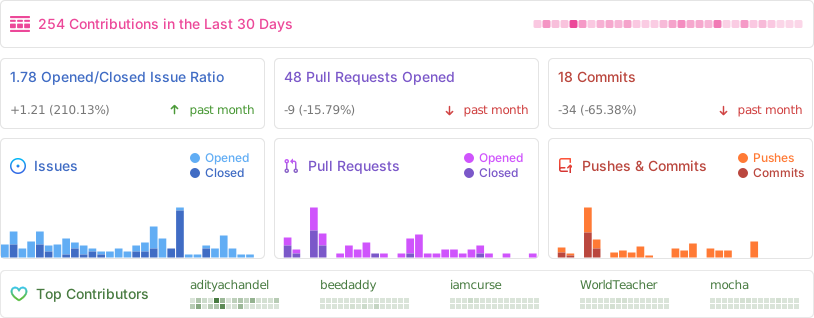
Repository Activity
⭐ Star History
👨💻 Contributors
Thanks to all our amazing contributors! 🙏
Want to see your face here? Start contributing today!
🌟 Sponsors
Thank you to our amazing sponsors!

Become a sponsor and get your logo here! Support us on Open Collective
⚖️ License
GNU General Public License v3.0
Copyright © 2024-2025 BookLore

Made with ❤️ by the BookLore community